
Find a couple's gift list
Friends & family, please enter the List ID and either partner's surname.
How to buy a gift
Step 1
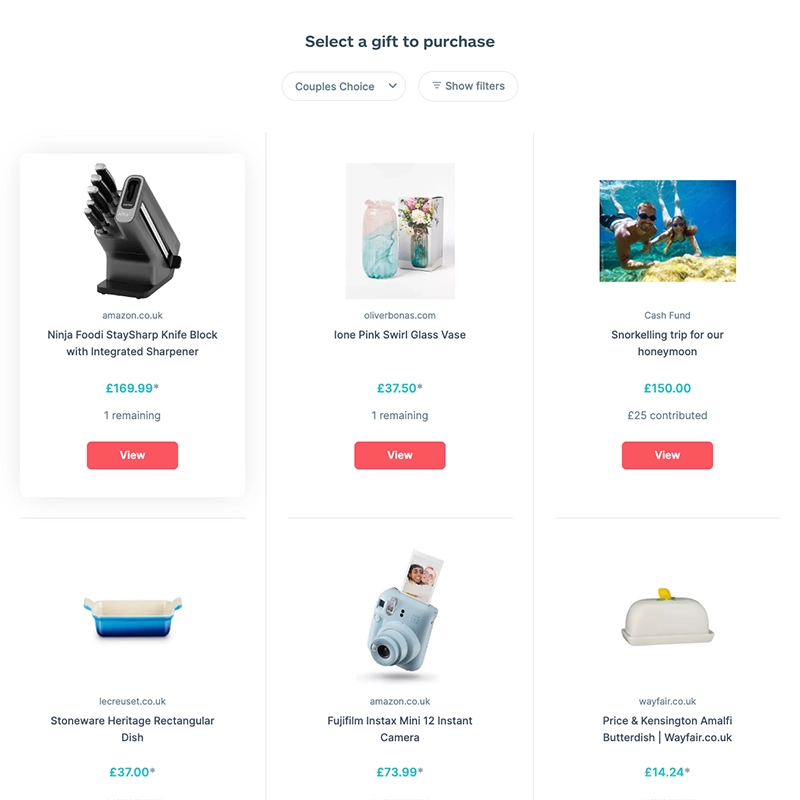
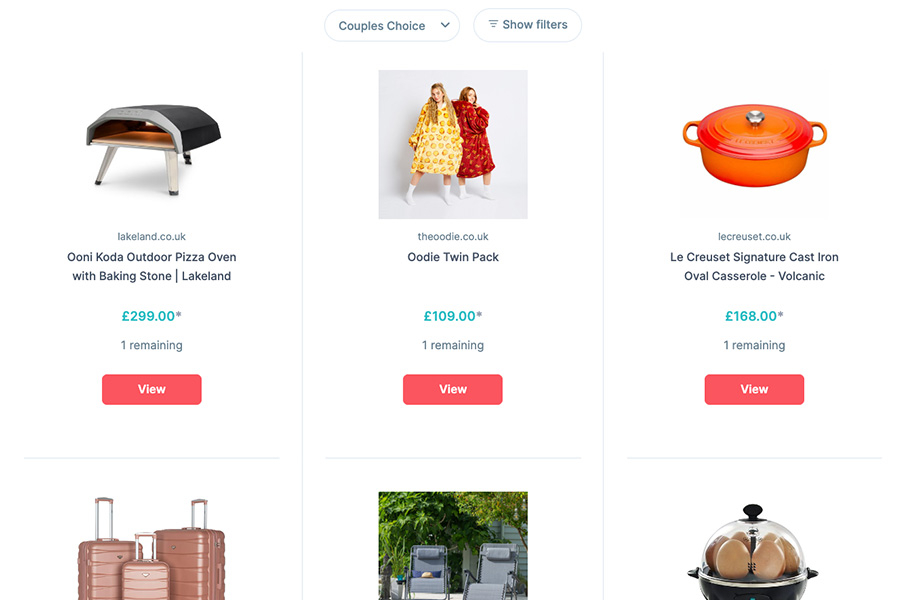
Once you have seen a gift you would like to purchase, click the "View" button for your chosen gift.
Step 2
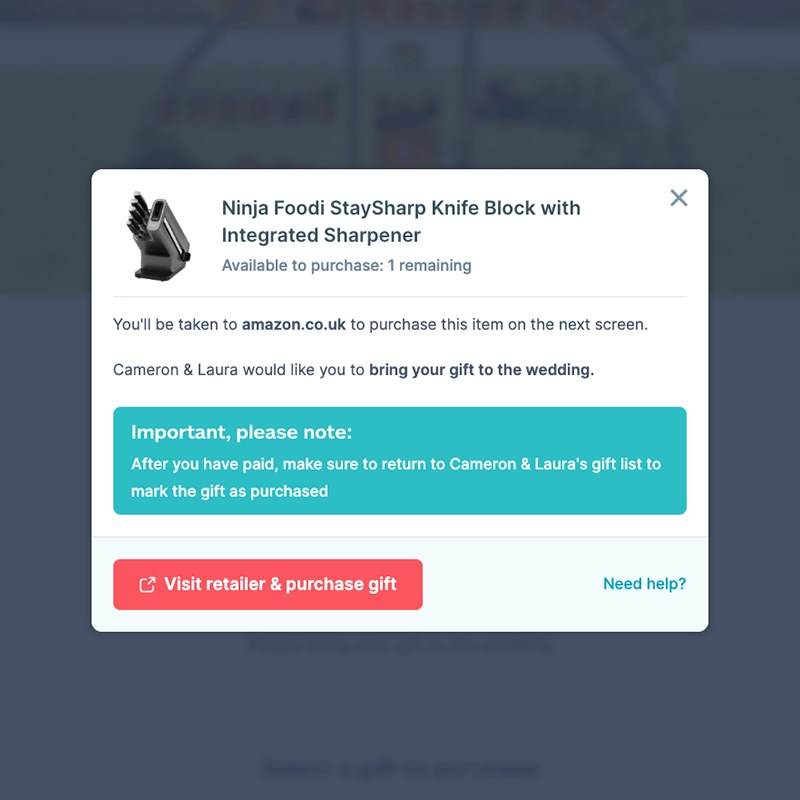
Read the instructions carefully and take note of the couple's delivery request. When ready click the button "Visit retailer & purchase gift".
Step 3
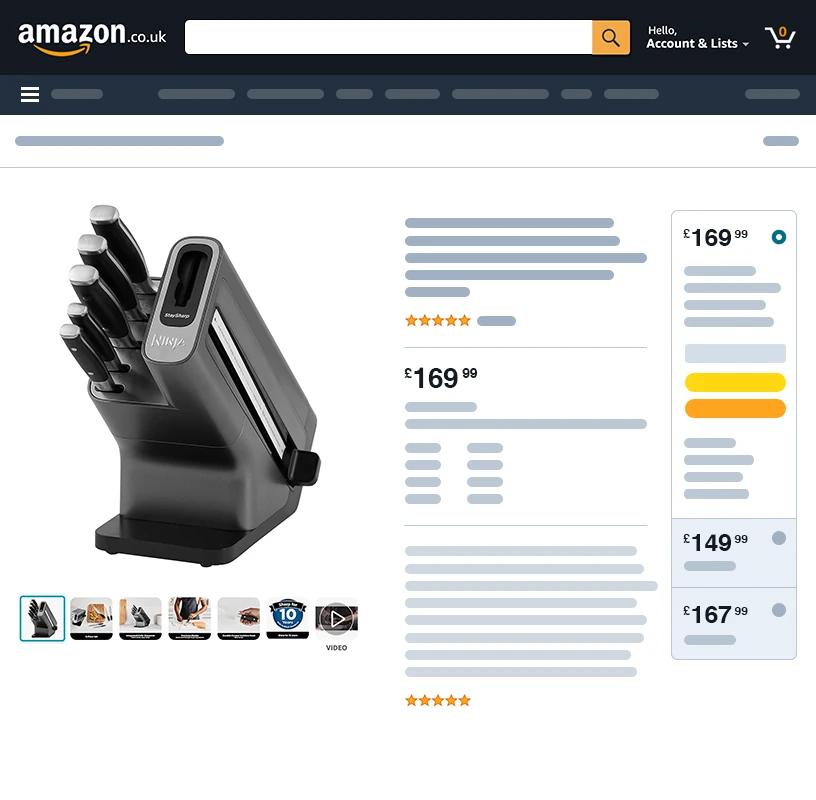
You will be transferred to the retailer's website. Add the gift to your basket and head to the checkout. Make sure to enter the correct delivery details and then pay for the item.
Step 4 - Important part...
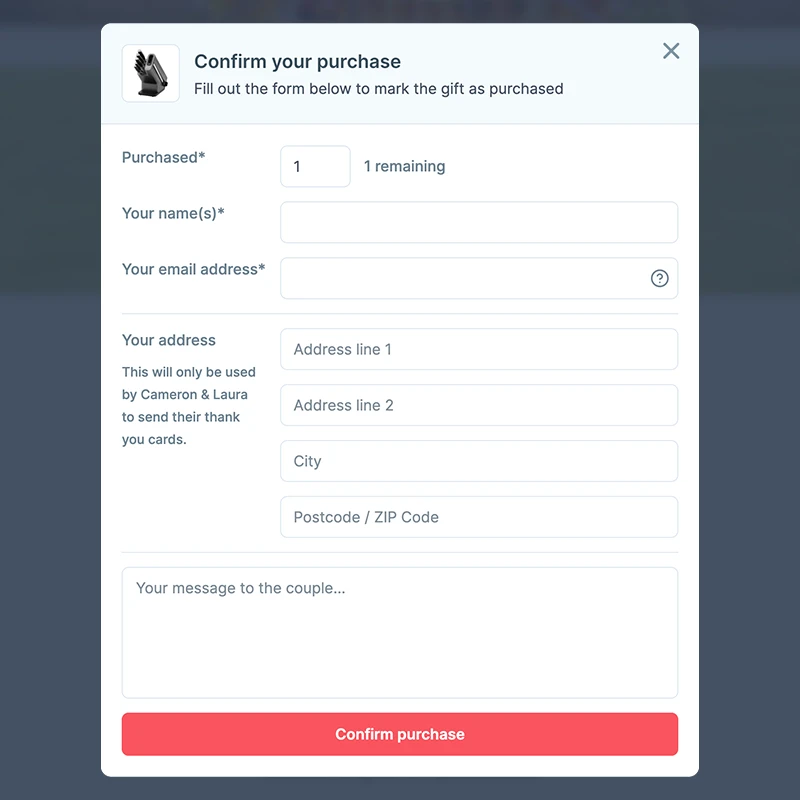
Return to the couple's gift list and complete the form to mark the gift as purchased.
Frequently asked questions
How do I buy a gift?
You'll browse the couple's gift list here, but you'll be purchasing directly from the retailers' websites.
- Find the gift you want to buy on the couple's list.
- Click the gift and carefully read any instructions or delivery requirements.
- Click "Visit Retailer & Purchase Gift" to be directed to the retailer's website.
- Add the gift to your basket and proceed to checkout on the retailer's website.
- Make sure to use the delivery information provided by the couple and complete your purchase on the retailer's website.
Here's the important part… Once you've purchased the gift on the retailer's website, return to the couple's gift list. A confirmation box will appear where you can mark the gift as purchased by completing the form.
I have already purchased the gift, how do I mark it as purchased?
Didn't see the purchase confirmation popup? No worries! You can still mark your gift as purchased.
- Find the gift you bought on the list and click on it again
- Below the 'Visit retailer & purchase gift' button, you'll see a link for 'Mark as purchased.'
- Complete the short form to confirm your purchase.
Why was I taken to another website when trying to give a gift?
Marriage Gift List lets couples create a wishlist with gifts from any online store, so we don't sell the items ourselves.
When you choose a gift, you'll be taken directly to the retailer's website to complete your purchase securely. In some cases, we use an affiliate link, which means the retailer may thank us with a small commission (at no extra cost to you).
For cash gifts, you'll be taken to a secure payment page where you can contribute using your credit or debit card. It's fast, safe, and the money goes straight to the couple's bank account.
Where do I send the gift?
The shipping address will appear at the top of the couple's gift list and in the pop-up of your chosen gift. Simply copy and paste the address when you go through the checkout process on the retailer site.
If you plan to give your gift in person, then ship the gift to your own address instead.
I purchased a gift but it has not arrived, can you help?
We understand your concern! While Marriage Gift List connects you to retailers, we don't handle the purchase or delivery of the gifts themselves.
Important to note: Your purchase agreement is directly with the retailer you buy the gift from. We are unable to intervene in disputes regarding the delivery or quality of the gifts.
If you haven't received your gift yet, we recommend contacting the retailer directly. They will be able to assist you with tracking your purchase and answer any questions you may have.
I marked a gift as fulfilled by mistake. How do I undo this?
No worries! We understand mistakes can happen. Here's how to easily fix it:
- Look for an email from Marriage Gift List titled "You’ve Chosen a Gift for [Couple's Names]" (check your spam folder if needed).
- Scroll down to the section titled "Changed your mind?" and click the provided link.
- You'll see the gift that you marked. Click "Undo your gift selection" to make it reappear on the couple's gift list.
Didn't receive the email? Don't worry! Simply contact us at hello@marriagegiftlist.com. In your message, please mention one of the couple's surnames and the name of the gift you want to unmark.
Can I contribute towards a gift?
We currently offer contributions towards a cash fund to help the couple celebrate their new life together.
Looking to contribute towards a specific physical gift? While this option isn't available directly yet, we encourage you to reach out to other guests to inquire about splitting the cost.
If you decide to coordinate with another guest, one of you can simply mark the desired gift as purchased on the registry to avoid duplicates.
How do I buy multiple items from the same retailer?
To keep it simple you would want to add all of your items to the same shopping cart, so you can go through the checkout process once (which may save on shipping costs).
Here are the steps to take:
- Find your gifts: Browse the gift list and choose the items you want from the same store.
- Proceed to retailer: Click on the first item and proceed to the retailer's website. Add it to your shopping cart but don't check out just yet.
- Mark as purchased: Return to Marriage Gift List and confirm your purchase by clicking "Yes, I have paid." Fill out the form and let the couple know.
- Repeat for other items: Select the next gift from the same store on the gift list. Go back to the retailer's website and add it to your cart. You'll likely see your previous item there too.
- Check out: Once you've added everything, you can make the payment on the retailer's website.
- Avoid duplicates: If you forgot to mark any of the products as purchased you can click on the gift and click on "Mark as purchased".
I have a problem with the gift I ordered, who do I contact?
We understand that issues with your purchase can be frustrating. While Marriage Gift List cannot directly assist with these matters, we can guide you in the right direction.
Marriage Gift List functions as a gift registry platform. We connect you with the retailers where the couple has registered their gifts. However, we are not involved in the purchase or fulfillment process.
For any inquiries or concerns regarding the gift you purchased, please contact the retailer directly. Their customer service team is equipped to handle issues related to delivery delays, damaged items, returns, or exchanges.
Why is the price different on the retailer's website
Retailer prices can occasionally change. This means the price you see on the gift list might not always match the current price on the retailer's website.
The retailer's website will always display the most up-to-date price. Unfortunately, Marriage Gift List cannot automatically update prices due to constant fluctuations.
Here's what you can do:
- Proceed with the purchase based on the price listed on the retailer's website.
- If you'd like to inform the couple about the price difference, you can contact them.
Can I send a cash gift?
Absolutely! Here's how easy it is to send a cash gift through the couple's list:
- Select the cash gift you'd like to contribute to (like their honeymoon or new home fund).
- Fill in a short form with your name and message, so the couple knows who to thank.
- Enter the amount you'd like to give and securely complete your payment using your credit or debit card.
That's it! Your contribution goes straight to the couple's bank account, and your thoughtful message will be included on their gift list.
How does Marriage Gift List work?
Here's how Marriage Gift List makes gifting easier:
- Couples build their list: Add gifts from any online store or create cash gifts for things like honeymoons or home deposits.
- Guests browse and give: Find the perfect gift or cash fund, then securely complete your purchase or contribution right from our site.
- Diverse selection: Whether it's high street, luxury or indie retailers, couples can include any store link.
- Transparent for everyone: Gift items are bought at the retailer's price; cash gifts carry a small, clearly-disclosed processing fee during setup.
Latest from The Aisle
Find styles, trends, and ideas to make your wedding unique.

A wedding gift list without the markups.
| Features | Other Gift Lists | Marriage Gift List |
|---|---|---|
| Add items from any store |  |
 |
| No markups on retail gifts | |
|
| Clear, upfront pricing on cash funds | |
|
| No commitments | |
|
No commitment required. Try it out before you sign up.